Thursday, February 12, 2009

DON


DON Ke Phone Ka Intzaar To 11 college ki ladkiya kar rahi hai;
Par DON Ka Phone Aana Mumkin hi nahi Namumkin Hai.
Kyoki.....
DON ke Phone me Balance HI Nahi hai.

Wednesday, February 11, 2009

I am sitting in my office..........

Here i am sitting in my office @ night…
Thinking hard about life
How it changed from a maverick collage life to strict professional life…...

How tiny pocket money changed to huge monthly paychecks
but then why it gives lesss happiness….


How a few local denim jeans changed to new branded wardrobe
but then why there are less people to use them


How a single plate of samosa changed to a full Pizza or burger
But then why there is less hunger…..


Here i am sitting in my office @ night…
Thinking hard about life
How it changed…..


How a bike always in reserve changed to bike always on
but then why there are less places to go on……


How a small coffee shop changed to cafe coffee day
but then why its feels like shop is far away…..


How a limited prepaid card changed to postpaid package
but then why there are less calls & more messages……


Here i am sitting in my office @ night…
Thinking hard about life
How it changed…..


How a general class journey changed to Flight journey
But then why there are less vacations for enjoyment….


How a old assembled desktop changed to new branded laptop
but then why there is less time to put it on……….

How a small bunch of friends changed to office mate
but then why after 8'o Clock it always feel like getting late….


Here i am sitting in my office @ night…
Thinking hard about life
How it changed….. how it changed……..

See where your friends are with Google Latitude

Gmail is about keeping you in touch with the people you care about, independent of the large, or sometimes small, distances that might separate you from them. That's precisely why email, IM, and voice and video chat are so powerful -- the "where" is irrelevant.

With Google Latitude, a new feature on Google Maps for mobile and a gadget for iGoogle coming out today, we're kind of turning that idea on its head, making the "where" matter again. Latitude allows you to see where your friends are located in real time on a map, anywhere in the world.


Use your Gmail account to join Latitude and you can specify which of your Gmail contacts can see your location. You can choose to automatically detect your best location, share city-level information only, set your location manually, or hide your location altogether. (To learn more about Google Latitude's privacy controls, check out this video.)

From within Latitude you can communicate with your friends via text message, Google Talk, Gmail, or a good old fashioned phone call. Your status messages and profile picture are synced with your Gmail account, so as you update them on the go, your Gmail contacts will see the changes in real time.

To try Google Latitude, go to google.com/latitude from your computer or your phone's mobile browser. Latitude is available on Android, Blackberry, S60, Winmo, and will be coming soon to the iPhone, through the Google Mobile App.

New in Labs: Multiple Inboxes

I'm seriously into filters and labels. All the email I get related to Flash goes under my "flash" label, everything about paragliding goes under "flying," and they all skip my inbox because that's how I like to stay organized. But when new email arrives I have to switch to the "flash" label first, then click on "paragliding," etc. I wanted a way to see it all at once.

So when I heard about Gmail Labs, I started implementing a Labs feature in my 20% time that would help me (and you!) spend less time monitoring important messages that may end up getting filtered away. Starting today, you can try Multiple Inboxes, a Labs experiment which makes it possible to have more than one 'inbox' in your default Gmail view.

An image is worth a thousand words, so here's what my inbox looks like:


In addition to a quick view of my important labels, I also like to keep all my starred and draft messages in separate panels.

After you turn on Multiple Inboxes from the Labs tab under Settings, you can configure what you want to see, as well as set the number of messages displayed and the positioning of your panels from the Multiple Inboxes section under Settings.

However you choose to use it, let us know how we can improve the Multiple Inboxes experiment -- all feedback is welcome.

New in Labs: Offline Gmail

Web-based email is great because you can check it from any computer, but there's one little catch: it's inherently limited by your internet connection. From public WiFi to smartphones equipped with 3G, from mobile broadband cards to fledgling in-flight wireless on airplanes, Internet access is becoming more and more ubiquitous -- but there are still times when you can't access your webmail because of an unreliable or unavailable connection.

Today we're starting to roll out an experimental feature in Gmail Labs that should help fill in those gaps: offline Gmail. So even if you're offline, you can open your web browser, go to gmail.com, and get to your mail just like you're used to.

Once you turn on this feature, Gmail uses Gears to download a local cache of your mail. As long as you're connected to the network, that cache is synchronized with Gmail's servers. When you lose your connection, Gmail automatically switches to offline mode, and uses the data stored on your computer's hard drive instead of the information sent across the network. You can read messages, star and label them, and do all of the things you're used to doing while reading your webmail online. Any messages you send while offline will be placed in your outbox and automatically sent the next time Gmail detects a connection. And if you're on an unreliable or slow connection (like when you're "borrowing" your neighbor's wireless), you can choose to use "flaky connection mode," which is somewhere in between: it uses the local cache as if you were disconnected, but still synchronizes your mail with the server in the background. Our goal is to provide nearly the same browser-based Gmail experience whether you're using the data cached on your computer or talking directly to the server.

Offline Gmail is still an early experimental feature, so don't be surprised if you run into some kinks that haven't been completely ironed out yet. We've been using offline Gmail internally at Google for quite a while (I've read thousands of messages and answered hundreds en route to visit my son and my daughter). And it's saved me more than once when my home network connection ran into issues (we have squirrels at home that love to chew through outside cable wires). Now we're ready to have a larger set of people try it out, so we're making it available in Gmail Labs for those of you who want to test out Gmail's latest and greatest and send us your feedback.

We're making offline Gmail available to everyone who uses Gmail in US or UK English over the next couple of days, so if you don't see it under the Labs tab yet, it should be there soon. Once you see it, just follow these steps to get started:
  1. Click Settings and click the Labs tab.
  2. Select Enable next to Offline Gmail.
  3. Click Save Changes.
  4. After your browser reloads, you'll see a new "Offline0.1" link in the upper righthand corner of your account, next to your username. Click this link to start the offline set up process and download Gears if you don't already have it.

Saturday, February 7, 2009

Atal Bihari Vajpayee| अटल बिहारी वाजपेयी | I wish you for good Health


I wish you Health…
So you may enjoy each day in comfort.
I wish you the Love of friends and family…
And Peace within your heart.
I wish you the Beauty of nature…
That you may enjoy the work of God.


13th & 16th Prime Minister of India
In office
May 16, 1996 – June 1, 1996
Preceded by P.V. Narasimha Rao
Succeeded by H.D. Deve Gowda
In office
March 19, 1998 – May 22, 2004
Preceded by I. K. Gujral
Succeeded by Manmohan Singh
Born December 25, 1924 (1924-12-25) (age 84)
Gwalior State, India
Political party Bharatiya Janata Party
Occupation Politician , Poet
Religion Hindu
Signature Atal Bihari Vajpayee's signature

Atal Bihari Vajpayee (Hindi: अटल बिहारी वाजपेयी, IPA: [əʈəl bɪhaːɾiː ʋaːdʒpeiː]) (born December 25, 1924) served as the thirteenth and sixteenth Prime Minister of India. After a brief stint as Prime Minister in 1996, Vajpayee headed a coalition government from October 13, 1999 until May 19, 2004. He has since retired from active politics, though as a Member of Parliament, he has at times commented on various issues.

Friday, February 6, 2009

SEO Basics | Search Engine Optimization Made Easy

Search engine optimization (SEO) is the art and science of publishing and marketing information that ranks well for valuable keywords in search engines like Google, Yahoo! Search, and Microsoft Live Search. If you run into any new jargon while reading this Knol consider looking up their definitions using the Search Engine Marketing Glossary.
Search engines only show 10 results on the first page, and most searchers tend to click on the top few results. If you rank at the top business is good, but if you are on the second or third page you might only get 1% of the search traffic that the top ranked site gets.
The 2 most powerful aspects of search engine marketing are
  • users type what they want to find into search boxes, making search engines the most precisely targeted marketing medium in the history of the world
  • once you gain traction in the search results the incremental costs of gaining additional exposure are negligible when compared with the potential rewards, allowing individuals and small businesses to compete with (and perhaps eventually become) large corporations
While many people consider SEO to be complicated, I believe that SEO is nothing but an extension of traditional marketing. Search engine optimization consists of 9 main steps
  1. market research
  2. keyword research
  3. on page optimization
  4. site structure
  5. link building
  6. brand building
  7. viral marketing
  8. adjusting
  9. staying up to date

Market Research


Do you have what it takes to compete in a market?
The first step is to search the major search engines to see what types of websites are ranking for words which you deem to be important. For example, if mostly colleges, media, and government institutions are ranking for your most important terms it may be difficult to rank for those types of queries. If, on the other hand, the market is dominated by fairly average websites which are not strongly established brands it may be a market worth persuing.

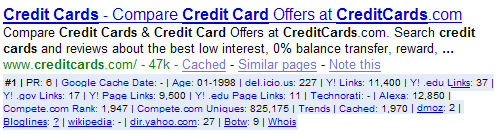
You can extend out the research you get from the search results by using the SEO for Firefox extension with the Firefox browser. This places many marketing data points right in the search results, and thus lets you see things like
  • site age
  • Google PageRank
  • inbound link count
  • if any governmental or educational sites link at their site
  • if they are listed in major directories
  • if bloggers link at their sites
The blue area under this CreditCards.com listing shows a wide array of marketing information.

Keyword Research


What keywords are people searching for?

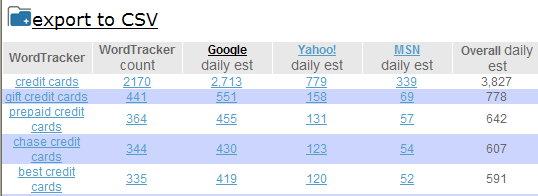
Use the SEO Book Keyword research tool to search for popular and Long Tail keywords related to your industry. This tool cross references the Google Keyword Tool, Wordtracker, and other popular keyword research tools. Notice how our keyword tool provides daily search estimates and cross references other useful keyword research tools.


Keyword research tools are better at providing a qualitative measure than a quantitative measure, so don't be surprised if actual traffic volumes vary greatly from the numbers suggested by these tools. When in doubt you can also set up a Google AdWords account to test the potential size of a market.

In addition to looking up search volumes for what keywords you think are important also take the time to ask past customers how they found you, why they chose you, and what issues were important to them in chosing you.

You can also get keyword ideas by doing things like
  • checking your web analytics or server logs
  • looking at page contents of competing websites
  • looking through topical forums and community sites to see what issues people frequently discuss

Site Structure


How should you structure your site?

Before drafting content consider what keywords are your most important and map out how to create pages to fit each important group of keywords within your site theme and navigational structure based on
  • market value
  • logical breaks in market segmentation
  • importance of ranking in building credibility / improving conversion rates
You may want to use an Excel spreadsheet or some other program to help you visualize your site structure. This mini-screenshot from an Excel spreadsheet shows example data for how you might align keywords for a section of a site focused on home based businesses, start ups, and franchise opportunities.


Make sure
  • your most important categories or pages are linked to sitewide
  • you link to every page on your site from at least one other page on your site
  • you use consistant anchor text in your navigation
  • you link to other content pages (and expeically to action items) from within the content area of your website
If you are uncertain how deep to make a portion of the site start by creating a few high quality pages on the topic. Based on market feedback create more pages in the sections that are most valuable to your business.

On Page Optimization


It is hard to rank for keywords that do not appear in your page content, so each page should be organized around the goal of ranking for a specific keyword phrase, with some related phrases and related keywords mixed into the page copy.
Unique descriptive page titles play a crucial role in a successful search engine optimization campaigns. Page titles appear in the search results, and many people link to pages using the page title as their link anchor text.

If possible create hand crafted meta description tags which compliment the page title by reinforcing your offer. If the relevant keywords for a page have multiple formats it may make sense to help focus the meta description on versions you did not use in the page title.

As far as page content goes, make sure you write for humans, and use heading tags to help break up the content into logical sections which will improve the scanability and help structure the document. When possible, make sure your page content uses descriptive modifiers as well.

Each page also needs to be sufficiently unique from other pages on your site. Do not let search engines index printer friendly versions of your content, or other pages where content is duplicate or nearly duplicate.

Link Building


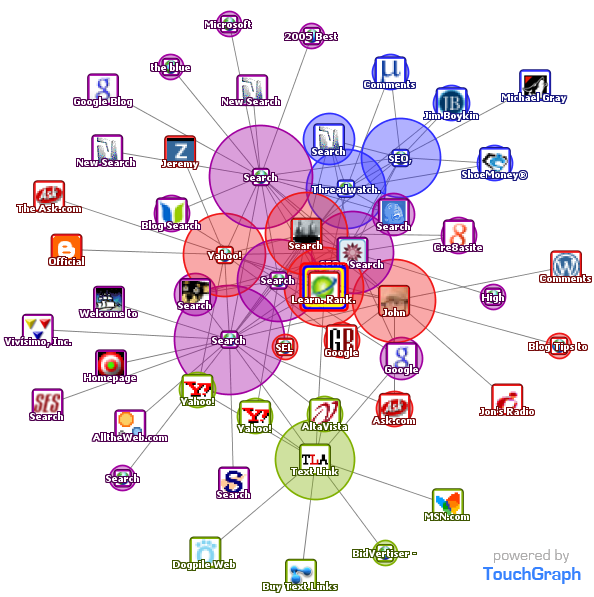
Search engines view links at votes, with some votes counting more than others. To get high quality links (that help your site rank better) you need to participate in the social aspects of your community and give away valuable unique content that people talk about and share with others. The below Google TouchGraph image shows a small graphic representation of sites in the search field that are related to SeoBook.com based on linking patterns.


In this post Matt Cutts suggested that Google is getting better at understanding link quality. Search engines want to count quality editorial votes as links that help influence their relevancy algorithms.
Link building tips
  • try to link to your most relevant page when getting links (don't point all the links at your home page)
  • mix your anchor text
  • use Yahoo! Site Explorer and other tools to analyze top competing backlinks
  • don't be afraid to link out to relevant high quality resources
Link building strategies

Brand Building


Brand related search queries tend to be some of the most targeted, best converting, and most valuable keywords. As you gain mindshare people will be more likely to search for your brand or keywords related to your brand. A high volume of brand related search traffic may also be seen as a sign of quality by major search engines.

If you build a strong brand when people search for more information about your brand and other websites have good things to say about your brand, these interactions help reinforcing your brand image and improving your lead quality and conversion rates.

Things like advertising and community activity are easy ways to help improve your brand exposure, but obviously branding is a lot more complicated than that. One of my favorite books about branding is Rob Frankel's The Revenge of Brand X.

Viral Marketing


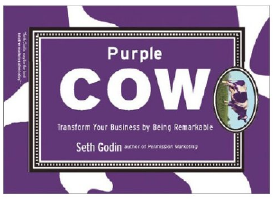
Link building is probably the single hardest and most time consuming part of an effective SEO campaign, largely because it requires influencing other people. But links are nothing but a remark or citation. Seth Godin's Purple Cow is a great book about being remarkable.
The beautiful thing about viral marketing is that creating one popular compelling idea can lead to thousands of free quality links. If your competitor is building one link at a time and you have thousands of people spreading your ideas for you for free then you are typically going to end up ranking better.
In SEO many people create content based around linking opportunities. Many of us refer to this as Link Baiting. You can learn link baiting tips from
You can search social news or social bookmarking sites like Digg or Del.icio.us to see what stories related to your topic became popular.

Measuring Results


Half the money I spend on advertising is wasted; the trouble is I don't know which half.
- John Wanamaker
How can I tell if my SEO campaign is effective? The bottom line is what counts. Is your site generating more leads, higher quality leads, or more sales? What keywords are working? You can look at your server logs and an analytics program to track traffic trends and what keywords lead to conversion.
Outside of traffic another good sign that you are on the right track is if you see more websites asking questions or talking about you. If you start picking up high quality unrequested links you might be near a Tipping Point to where your marketing starts to build on itself.

Search engines follow people, but lag actual market conditions. It may take search engines a while to find all the links poiting at your site and analyze how well your site should rank. Depending on how competitive your marketplace is it may take anywhere from a few weeks to a couple years to establish a strong market position. Rankings can be a moving target as at any point in time
  • you are marketing your business
  • competitors are marketing their businesses and reinvesting profits into building out their SEO strategy
  • search engines may change their relevancy algorithms

Keeping up to date


How do you track the changes in the SEO market? In my SEO tools I also offer Google Gadgets, which make it easy for you to embed keyword, competitive, and link research tools inside any webpage. You can track your ranking changes using this free keyword rank checker.
If you want to keep up with how the SEO market as a whole is changing consider using any of the following resources
We also offer guides to blog SEO and charity SEO. And if you want an up to date training program consider joining our SEO training program.

Best of luck with your sites!

Thursday, February 5, 2009

Voice recognition software reads your brain waves


Mind-reading software developed in the Netherlands can decipher the sounds being spoken to a person, and even who is saying them, from scans of the listener's brain.

To train the software, neuroscientists used functional magnetic resonance imaging (fMRI) to track the brain activity of 7 people while they listened to three different speakers saying simple vowel sounds.

The team found that each speaker and each sound created a distinctive "neural fingerprint" in a listener's auditory cortex, the brain region that deals with hearing.

This fingerprint was used to create rules that could decode future activity and determine both who is being listened to, and what they are saying.
Tell-all brain

"We have [created] a sort of speech-recognition device which is completely based on the brain activity of the listener," explained Elia Formisano of Maastricht University, who led the group.

The team hopes to match recent advances in using fMRI to identify what a person is looking at from their brain activity. Until now, the best mind-reading feats achieved for auditory brain activity extended only to differentiating between different categories of sounds, such as human voices versus animal cries.

"This is the first study in which we can really distinguish two human voices, or two specific sounds," Formisano told New Scientist.
Hello, I'm listening

In the course of making that possible, the team made new discoveries about how the brain processes speech.

They found that, whatever sound a person makes, they trigger the same voice fingerprint in the brain. Likewise, a given vowel sound produces the same fingerprint, independent of the speaker

This makes it possible to have software recognise combinations of speakers and sounds that it has not encountered before. It should be possible to teach the system how to recognise all the component sounds of speech, and then recognise full words, Formisano says.

"Vowel sounds are not meaningful, but they are language," he says. "These are the building blocks of language."
Noisy world

The group are now working to make the system robust enough to recognise more complex sounds without training, and in a noisy environment.

"It's interesting to see fMRI techniques extended to the auditory cortex," said Kendrick Kay of the University of California, Berkeley, who studies the brain's visual systems using similar methods and earlier this year created a system that decodes brain activity to reveal what a person is looking at.

The fact that the Netherlands team has shown that the brain deals with the categorisation of speakers and sounds differently is particularly significant, he says.
Office helper

The new approach could help improve voice recognition software, Formisano says, although probably not by leading to a commercially-available system to transcribe conversations from people's brains.

Instead, the existing mind-reading software will make it possible to break down the human brain's impressive ability to process sound and voices, even in the face of distracting background noise. Copying those tricks would provide a new way to make voice recognition software much more effective.

Web 3.0: Playing it safe with our data

Web 2.0 is well established, and sites like YouTube, Flickr, Facebook and Digg have turned the internet from a static source of information into a huge, interactive digital playground. So where to next? What will the next stage of web culture - what some people call web 3.0 - be like?

The overall message seems to be that there are profound changes on the way. If web 2.0 is about generating your own content and sharing it, web 3.0 will be about making information less free. Privacy fears, new forms of advertising, and restrictions imposed by media companies will mean more digital walls, leading to a web that's safer but without its freewheeling edge.

One reason for this is a new realism about personal information. Right now, most web users casually store scads of personal information on the web - email on webmail servers, photographs on Flickr, appointment calendars on Google Calendar, travel plans on Dopplr, and so on. This openness is one of the defining features of web 2.0, but software specialist Nat Torkington of high-tech publishing house O'Reilly Media predicts a backlash.

He argues that one major leak or theft of private data could change the climate overnight. "It could be a Three Mile Island of the net," he says, referring to the 1979 accident that turned the US public against nuclear power. If this happens, users will start to remove their personal details from web services, Torkington believes, or at least impose restrictions on it.

"We'll see a hybrid model," he says, with software that communicates with the web while storing private information on your own computer. So you might use Gmail to sort through your mail but download personal messages to a more private spot. Regions of the web now devoted to the unhindered exchange of information - YouTube, Facebook and the like - may evolve into gated communities where only select people have access to any given piece of data.
Regions of the web dedicated to free flow may evolve into gated communities

Another factor that will restrict web freedom is advertising. According to Brian Davison, a computer scientist at Lehigh University in Bethlehem, Pennsylvania, its influence will continue to grow. Desperate to be noticed by people whose attention spans are a mouse click long, advertisers will invent ever more devious strategies to suck you in.

A few tricks are around already. Say you are trying to reach Microsoft.com, but you accidentally type Macrosoft.com. You'll end up on a page for a company whose name has nothing to do with the word Macrosoft - they're just parked in that domain to get more exposure. You'll find something similar at Mycrosoft.com.

Web advertising is evolving quickly, though. The next generation will sneak into search results, Davison says. For example, a website that sells movie posters might worm its way into the results for a movie review. The link might look useful, but clicking through will bring up an advert. The danger is that such activity will gum up search results, stopping us finding what we need.

Web advertising is likely to balloon from another direction too. The next five years could see a dramatic change as "blogvertising" takes off.

Already, ads that once appeared in print are showing up on blogs. Bloggers stand to gain ever more of the advertising share for one simple reason: they can create custom content for advertisers. This is leading to a new style of blog that blurs the line between editorial and advertisement.

Federated Media, a company that specialises in bringing bloggers and advertisers together, has been a pioneer in this area. It helped Samsung advertise its HD TVs by creating a blog called Defining Moment. Sports bloggers contributed their posts about the best moments within sports games in exchange for ad money. All advertising on the site was by Samsung.

Neil Chase, a former editor at The New York Times and now with Federated Media, doesn't see this blurring of ads and content as a problem. He argues that readers are adept at figuring out the difference between ads and editorial. If anything the new model may be making good on the old web dream of free media sharing for all, he argues, because it makes it possible for bloggers to make their writing available for free, while still getting compensated for it. Music and video content could go the same way, incorporating adverts to support their creators.

But wall-to-wall ads are not the only way to support media on the web, says Michael Geist at the University of Ottawa. He argues that another system can work for music and video: a media-sharing tax that makes it legal to download anything you like. Canada already has a version of this in the shape of a levy on blank CDs and DVDs. It means Canadians are allowed to engage in music file-sharing without being sued for copyright infringement.

Aishwarya Rai Premieres Pink Panther 2


Aishwarya Rai keeps it classic in black Alberta Ferretti at the premiere of The Pink Panther 2 at New York City’s Ziegfeld Theater on Tuesday (February 3).

The 35-year-old Bollywood beauty said of the film’s main star, “Steve Martin is an institution, I’ve watched his cinema growing up, and all the actors on board.”

PP2 opens everywhere on Friday (February 6) and also stars Jeremy Irons, Alfred Molina and John Cleese.

Wednesday, February 4, 2009

Computer Urban Myths =rand(200,99)

i got an interesting mail today, its kool

Open Microsoft Word and type

=rand (200,99)

and HIT ENTER

and see what happens, i guess some of u have already tried this out, im wondering how this is possible,

any suggestions, coz i have no clue

(how can this happen)


Urban Myth of =rand(200,99)

Just so that we are both on the same page, or the same wave-length. Launch Word for Windows and type precisely :

=rand(200,99)

Press 'Enter' or the Carriage Return key.

What you should get is zillions of: 'The quick brown fox jumps over the lazy dog'.

Trap 1: Avoid a space. There is no space between the = and rand; =rand(200,99) is correct. However, if you type '= rand(200,99)' then the space is wrong. This space is particularly troublesome in Word 2007.

Trap 2: Avoid the Word proofing feature called: 'Replace text as you type'. This is how to turn this option off:
a) Click AutoCorrect on the Tools menu, and then click the AutoCorrect tab. (Proofing section in Word 2007)
b) Click to clear the 'Replace text as you type' check box.
c) If all else fails call for Word's own help.
Problem with Word 2007

=rand(200,99) works with Microsoft Office Word 2003, but not with Microsoft Office Word 2007. Good news, there is a work-around, add .old thus:

Solution: =rand.old()

Press 'Enter', otherwise know as the Carriage Return key.

The secret of success is to attention to detail, with Word 2007, you need to substitute:
=rand.old() for =rand(200,99).

Once =rand.old() works, then try =rand.old(200,99). The first number indicates the number of paragraphs, and the second number, the number of lines within each paragraph.

Please have faith, believe that =rand.old() will work with Word 2007. At first I had my doubts, but I have now personally tested this .old update it works in Word 2007.

If you are having a problem with Microsoft Office Word 2003, make sure you don't have problems with PDFs. A PDF to word converter will help to convert files.
What is =rand()? An urban myth, a bug, an Easter egg?

The truth is rather boring, =rand(200,99) is a function Microsoft really did included by design. The urban myth is that =rand(200,00) is a bug with Word for Windows. A variation of this urban myth is that Microsoft programmers left an 'Easter Egg*' in the program.

Despite the prosaic truth that this is neither a bug nor an urban myth, you could baffling your friends by challenging them to type the phrase =rand(200,99) in their copy of Word for Windows 2003 or =rand.old(200,99) in Word 2007.
®
Background of =rand(200,99)

Word for Windows has a powerful built-in macro language. To see it in action, try highlighting text, then hold down the shift key while pressing F3 (Function key 3). Switching UPPER, lower and Proper case is an example of a more useful Word macro than =rand().

To return to =rand(200,99). The function creates one instance of 'The quick brown fox jumps over the lazy dog', even if you omit any numbers inside the bracket, =rand(), moreover you can try numbers other than 200 and 99, for example =rand(2,3). Soon you will realize that the first number refers to the paragraphs, while the second number refers to the sentences. Who ever initiated this urban myth wanted to demonstrate the maximum numbers of sentences and paragraphs.

=rand() is a well known random function, which is handy for statistics, or simulating card games such as blackjack.

The quick brown fox jumps over the lazy dog

A word about the phrase: The quick brown fox jumps over the lazy dog. This is a special, even classic sequence to check each and every letter in the English alphabet with just one sentance. Thus if you are experimenting with different fonts, you may want to see how all the letters would display.
Lorem Ipsum =lorem()

An older, more famous dummy text than 'The quick brown fox jumps over the lazy dog', is the Latin text know as: 'Lorem Ipsum'. Remember that the idea is to have meaningless dummy text so that you concentrate on the page layout. The thinking is that because the Lorem Ipsum text is Latin, we cannot understand the content, thus we can concentrate on how the text fills the page.

You can also apply what you learnt with with =rand(200,99) to =lorem(). What I mean is that you can control the number of paragraphs, and the number of lines within each paragraph, for example.

=lorem(2,6) This means two paragraphs, each with six lines.

Once again, beware: there should be no space between = and lorem(). Correct is =lorem()
*Easter Eggs

Easter Eggs in programs are a topic in their own right. Briefly, programmers often used to leave code in programs, partly to test, but mainly because most programs are geeks and games players. Perhaps I don't know the keys to operate them, perhaps the habit really has died out, but have not seen any good Easter Eggs for about 8 years.

Another Urban Myth is that Excel 1.0 had a complete version of Doom. To find it you had to go through a mind numbing sequence of keystrokes. Cynics say that Microsoft Executables are so large because they are full of this extra Easter Egg code.

Google launches Internet-enabled Bus in Tamil Nadu

Google India has launched Internet Bus, an internet-enabled bus that will reach out to people with limited knowledge and exposure to internet and give them a first-hand experience of what internet has to offer and how it may be beneficial to their lives. To begin with, the bus will cover 15 towns in Tamil Nadu over a period of one and a half months.

According to Google, the Internet Bus will have content in English and Tamil to give the users an understanding of how internet can be used for information, communication, entertainment and education. In addition to basic familiarization on using services like search, email, social networking and online maps the bus will showcase how internet can make everyday life simple.

The Internet Bus will also address the challenge around access and language for users in smaller cities by educating them on how they can access internet on their mobiles and use various Google tools to break the language barrier.

“With this initiative we want to take the power of the internet medium to people who will really benefit from it. We believe that if we can get people to experience the internet even briefly they will find the means to go back again,” said Prasad Ram, Head of R&D at Google India, has said.

“India needs more of such efforts. It is the collective responsibility of the government, the industry and academia to solve the challenges around access, costs and content. Once this is done, the possibilities of use are limitless,” Prasad Ram has added.